Background

Showing posts with label Lettering Delights. Show all posts

Wednesday, May 15, 2013

Teacher Appreciation Gifts

As an instructional math coach I work with over 40 high school math teachers. I wanted to share with each of them how much they are appreciated so I made crafty gifts. I am extremely thankful for Pinterest as I found almost all of my ideas there.

Gift #1: Marvelous & Magnificent Teacher
I found the glass cruets at Joanns in the wedding section. I used Inkscape to create the label which I have shared here and imported it into Silhouette Designer software to complete a print and cut.


Gift #2: Thank You Pillow Box
The pillow box is from Lettering Delights and was the perfect size for a 100 Grand. I used Make the Cut to cut them all and tied baker's twine around the flap. The little buttons are from Tuesday Morning where I purchased them at a going out of business sale.


Gift #3: Thanks for the 'Extra' work
These were made specifically for the Math Leadership Team. We meet once a month and the teachers are always taking on extra responsibilities. They are a wonderful team to work with and our teachers in the county benefit greatly from their leadership.

Gift #4: Thank you with Sharpies
I have been saving Crystal Light plastic canisters without any idea what I would do with them. Then I found this site where there was the idea and a free printable tag. I simply printed the tag and cut it out using scissors. Yep, no fancy cutting machine for this one. Just simple scissors and my xyron machine. This was the gift specifically for my son's teacher.

Gift #5 Lemonade
These were simple to make. I cut the strips at 2.5" wide and 10" long and scored it at 3" and 7.5". I used a Martha Stewart punch to cut the circle and an EK Success punch for the border.

Gift #6 M&M packs
After making gift #1 I had an entire bag of m&ms left. I made these treat bags and adorned the tag with washi tape and a small button.

I really enjoyed handing out the treats each day and letting the teachers know they are appreciated. Hope this has inspired you to send a little treat. Thanks for stopping by and have a blessed day!

Monday, October 29, 2012

Classroom Halloween Treats

October has been a very busy month and last week was the busiest. I started with staff development for all of the high school math teachers in my county on Monday. A PLC session for Course 1 teachers on Tuesday. Then I traveled to the state Math Leadership Conference on Wednesday, followed by the state math conference on Thursday & Friday (of which I had a part in planning). I also presented two sessions. Saturday I coordinated the Fall Festival at the church consisting of a Trunk or Treat, hot dog supper, hayride and bonfire. On top of all that I started getting sick. Spent the entire day in bed on Sunday and went to the doctor today.

Feeling much better, I finished the classroom treats for my son's classroom. I found this idea on Pinterest and my son thought it was hilarious. Using a large container of cheese puffs, we filled small snack bags. (We also discovered that our little dog loves cheese puffs.)


I used Frank's Friends Alpha from Lettering Delights for the pumpkin and designed the entire card in Inkscape. I imported into Silhouette Studio, enclosed with a rectangle, filled the page, and did a print and cut.


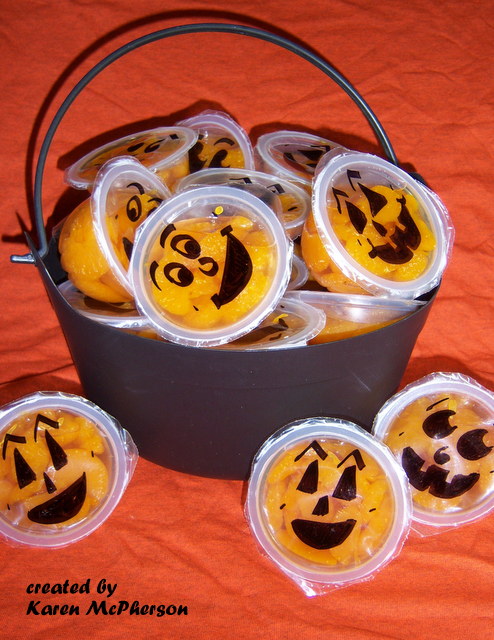
I couldn't resist the second project. (Again, I pinned it on Pinterest.) I purchased mandarin oranges in individual containers and used a Sharpie to draw faces.

That's all the projects I have for today. I have a few planned tomorrow for my colleagues. Thanks for dropping by and have a blessed day!

Sunday, September 23, 2012

A Sympathy Card

My SILs mother passed away this past week and I wanted to make a special card for her. I was inspired by Jin Yong's post on Simple Shapes at Under A Cherry Tree.
The entire project was done with MTC and cut with my Silhouette Cameo. I started with a 3" and a 2.5" square, stacked them, and did a Boolean Join. Next, I copied and pasted (in place) three other squares. I overlapped them slightly and welded them together. The words are Script MT Bold font with the letters welded together. I placed the words just touching the frame and did another weld. The butterfly is from LDs  Cloud Nine set. I created a shadow with blackout and was finished within a few minutes.

On the inside I printed "... and the greatest of these is love." to complete the verse from 1 Corinthians 13. The bling was put on with my irock tool.

I know it has been awhile since I posted so I don't know if anyone out there even reads these posts; but if you do, thanks for letting me share. If you are so inclined please pray for my SIL. This was sudden and she needs to feel God's strength to help her through.

Have a blessed day!

Saturday, May 26, 2012

Bride & Groom Wedding Card

One of the young ladies from our church got married today. I wanted to make her an extra special card. I decided to use Patricia Zapata's Ring Box Cut It from Lettering Delights. I used my Silhouette Cameo and Make the Cut. The top of the box is backed with a piece of colored vellum.
The lace is from the $1 bin at AC Moores and was wrapped around the edge. White self-adhesive pearls were used at each intersection of the rings. I liked how both added a little elegant look and went with the theme of a wedding card.
For the card, I used an image from the internet of a bride & groom holding hands. Pixel trace with MTC made cutting the image out very easy. The corner I found in the MTC gallery. The cardstock is a metallic blue that has a shimmer to it.
I used the embossing folder Butterfly Kisses from Craft Concepts on a piece of white vellum. I colored the back of the butterflies with my Spectrum Noir TB4 marker.
Finally the box was a little too deep for a single card so I cut a piece of white cardstock an inch larger in both dimensions, folded it an inch on each side, trimmed the corner pieces, and put it in the box. This lifted the card to the top. The ribbon is threaded through small slits I made in the bottom of the box and tied on top.

I am entering this in Ashley's Welch Creations Challenge #7, the ABC DT Challenge "Graduation or Wedding" card,  and the Cardz TV Challenge #109 "Say I Do"

By the way, the wedding was beautiful. Have a blessed day!

Thursday, May 24, 2012

Get Well Fast

I like sketch challenges but I don't participate as often as I would like. I have started following Allison at Stampin' When I Can. She has a weekly post where people can add their sketch challenges. It's great to have so many to choose from.

Yesterday I had some time to make a get well card for a little boy who had surgery. I followed the Mojo Monday Sketch 242. I used an image from LD's Fast Car graphic set. The lettering was done with Silhouette Studio. I'm not real happy with the button. I thought I could put a trophy but didn't find what I was looking for. Fisher and I included a Hot Wheels coloring book, crayons, and a Hot Wheel for him to enjoy while he is recovering.

Thanks for the visit.

Have a blessed day!

Monday, April 9, 2012

Altered Giant Clothespin

I have another pictorial for you today. I altered a giant clothespin as a gift for the members of the math leadership team in my county. This year they have worked hard to provide professional development and leadership for our county. Let's get started!

The materials I used are: patterned paper, giant clothespin (found at Michael's for $1), foam brush, x-acto knife, Mod Podge, brayer, bone folder, and nail file (not shown).
Start by cutting a rectangle large enough to cover the face of the clothespin. I placed the clothespin on the paper, traced, and cut it out. Don't worry if it is cut too big. We will trim it later. Using the bone folder, I made a crease in the paper to show where it needed to be cut to divide the paper into the upper and lower portion of the clothespin. (Wow, my bone folder looks dingy.)


I just used a pair of scissors to cut the paper. You can see in the picture below how it divides the paper into the two portions.
Next, paint a thin layer of the Mod Podge to the face of the clothespin using the foam brush.
Place the pieces of paper on the face and then use the brayer to get rid of any bubbles. (Be careful when applying pressure to the clothespin or it may go flying across the room.)
After the Mod Podge has had time to dry trim the excess paper using the x-acto knife. (I realized when editing the pictures that I did not stay consistent with which clothespin I was using as a model. Thus, you now see the green one instead of the blue.)
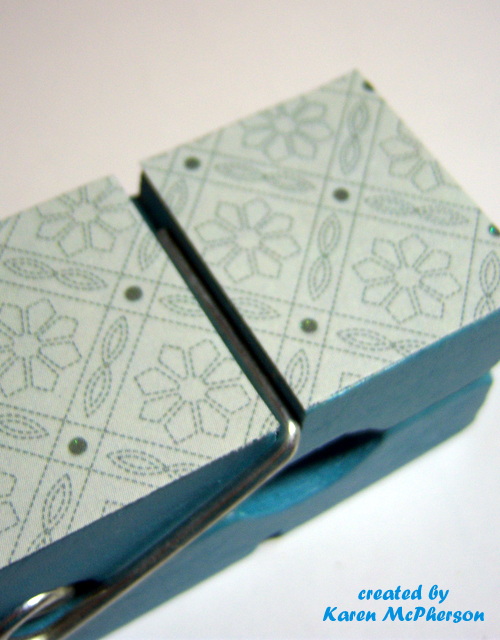
Use a nail file (or fine sand paper would) to file the edges. This made a big difference in the final project. It created a smoother transition from the paper to the painted wood. (Do you like the file? Another $1 find at Michael's.)
Apply a layer of Mod Podge to the top to seal the paper. This should prevent fading and possible water damage. You can do 2 or 3 layers if you wanted. (Again, I have snapped a picture of a different pattern.)
Here are all of the different patterns and clothespins. I used two paper companies: DCWV Linen Closet Stack & All Dressed Up Stack; My Mind's Eye Ooh La La Stack, Fine and Dandy Stack, and All Boy Stack. There are 14 total clothespins.
When I originally purchased the clothespins I thought they would be great for holding pictures or notes so I made a quick note to include. The apple is from Lettering Delights It Feels Like Autumn. It has a magnet on the back so the teachers can remove it and keep it. The note card was designed in the Silhouette Studio and cut out with the Cameo. I used an EK Success puch for the paper edge and a Studio G stamp for the thanks!
Here are the final products. I really had fun making these and they were pretty easy to do. I'll give them out tomorrow at our monthly meeting.
Thanks for visiting and I hope this inspires you to alter something. I would love to hear about your projects.
Have a blessed day!

Sunday, April 8, 2012

Birthday Flower

My niece turned one and so I made her a birthday card. The flower is from the Mulberry Lane Too svg from Lettering Delights. I brought it into the Silhouette Design software, traced several times for the different layers, and then cut them out.
I used my Cuttlebug to emboss the flower with Swiss Dots folder. For the stem and leaves I simple used an embossing tool to create the vines.

Have a blessed day!

Wednesday, April 4, 2012

Easter Treat Buckets

For my birthday last month my DH got me a wireless printer and the Silhouette Cameo. I had been talking about how much easier it would be to do print and cut projects. I had been able to do it with my Cricut but it was not an easy process. He listened and totally surprised me.

Here is my first project using my new tools. I found these cute little buckets in the $1 bin at Walmart so I snatched up 5 of them for Fisher's teachers and ladies at school. 
Although I didn't do anything to the bucket (they came with the sticker on the front) I did create several little goodies to fill it up.
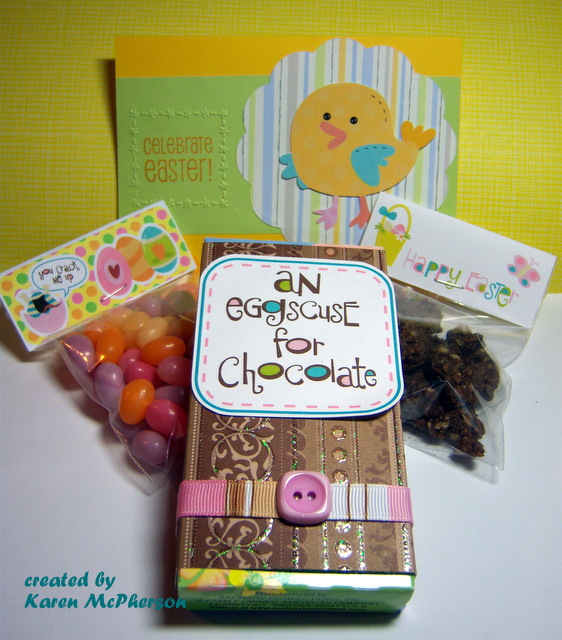
These are cranberry walnut chocolate granola clusters. The label was created with the Lettering Delights Easter Beasties. I used a 3"x 2.5" rectangle and designed the image in the bottom half. The Silhouette Cameo smoothly cut out the rectangle which I then folded in half and stapled to the bag.
These jelly bean bags were made the same way using Easter Beasties as well. Fisher picked out the saying "You Crack Me Up" which was one of the graphics provided in the set.
For the cards I used the chick from the Animal Buddies set from Lettering Delights. The scallop was cut from a nestability and the frame was embossed using the Cuttlebug. The stamps are Studio G Easter set.
I purchased chocolate bunnies and covered the boxes. Again the quote is from LD's Easter Beasties. The paper is from DCWV The Sweet Stack.
I included a Cadbury egg and some other pieces of candy in the bottom. Here are the finished buckets. We delivered them this morning.
I want to say a big THANK YOU to Jin Yong of Under A Cherry Tree. I have learned so much through her video tutorials. Take a look. She has some wonderful projects.

Have a blessed day!

Saturday, February 18, 2012

Up, Up, and Away

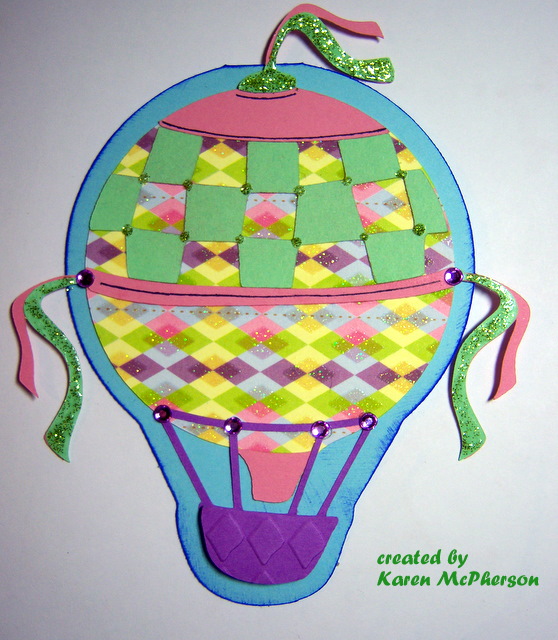
Ashley over at Welch Creations has posted a challenge to make a shaped card. I decided to join in by creating this hot air balloon card for my sweet cousin.
The balloon is from LD Balloon Craze. I used Make-the-Cut to import the file straight from my LD library. For the card base a made a shadow layer with blackout slightly larger than the balloon itself. I copied the image, reflected it vertically, then welded the two shadows at the top.
The pattern paper is from DCWV Nana's Kids Stack. I used stickles to accent the ribbon and small gems for a little bling. I embossed the basket using the Diamonds in the Rough folder and popped it using foam pop dots.

Have a blessed day!